
Changing Your Password in Webmail

Login to your webmail (This is usually just “email or webmail in front of your domain name, like this… http://email.yourdomain.com) 1. Settings 2. Personal Settings 3. Type in your Current Password 4. Type in your new password, but make it strong! ย ย ย ย ย ย ย  We recommend at least one lowercase letter, one uppercase letter, one number, and a special… Read more of this article

Authorize.net API for WooCommerce

3. Click New Transaction Key and then Submit 4. Get the code sent to the Account holder Email and press submit.ย  Then Copy the two items (API Login ID & API Transaction Key) 5. Do the same thing for the New Signature Key (yes it will give you a new code by email) Then copy the API Signature Key which is going to be VERY long. 6. Then in Admin on your website, go to WooCommerce… Read more of this article

I’m Getting Spam in My Contact Form

Problem as stated by many website owners:

Someone is sending me spam through my contact form.

Backstory/Details:

Technically, a spammer has chosen to fill the form out manually (as in.. a human has chosen to personally fill it out) because they cannot get a script (aka “bot“) to do the dirty work. This is because we have a very effective Google reCaptcha… Read more of this article

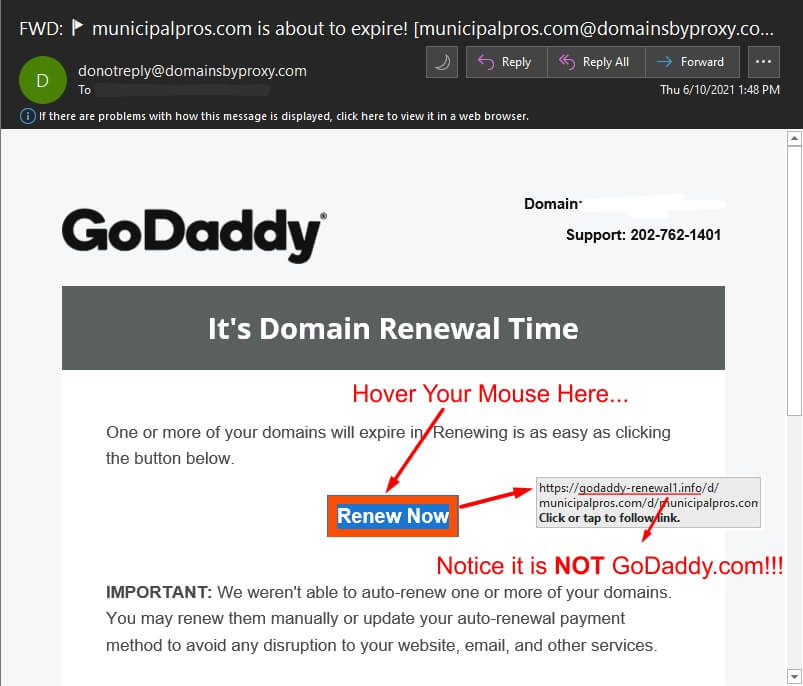
Beware of a Fake GoDaddy Domain Renewal Email!

So the hackers and scammers are at it again!

I just received an email today from a “would-be hacker” who was posing as GoDaddy. In this email, they were attempting to make their email look like a domain name renewal notification. They did a pretty good job of making it look like it was official. It’s always very important for us as small business… Read more of this article

Setting up a Hosts File on Windows

ATTENTION: If you have an IT person that manages your Computers or your Network, PLEASE make sure you ask their permission/approval before doing anything explained below. This can break a connection to a main office or server if the IT department has setup some kind of internal network for your company/organization. If you are a private business this may not… Read more of this article

Another User or Device is Deleting Mail

Problem: Emails seem to be deleting themselves after a certain number of days. Cause: You are most likely sharing your email with someone else in the company or you have the account set up on other devices. The email account on one of those other computers/devices were set up as a POP account and the account was set to delete from the server after X amount of days.… Read more of this article
